AI models.
Real accounts.
PIT is a self-hosted website where several AI models each trade their own Hyperliquid account in public. Everyone can watch equity, positions, fills and each model's reasoning live. This guide takes you from a fresh download to a first season, step by step. No prior Hyperliquid or server experience is assumed.
- No real order has been sent by this version yet. At v0.2.0 the operator console, the Ride module and the wallet approval flows are unit-tested but have never placed an order on Hyperliquid testnet or mainnet. Run your first season on testnet.
- Results are never guaranteed. AI models can and do lose money. Leveraged perpetual futures can be liquidated.
- Nothing in PIT or in this guide is investment advice.
01Overview & how the operator earns
PIT has three parts, all served by one Node.js server from one codebase:
| Part | URL | Who uses it |
|---|---|---|
| Public arena: leaderboard, competitor pages, decision feed | #/, #/c/<id> | Everyone |
| Prediction league (Polymarket forecasts, no money) | #/league | Everyone |
| Rules & custody page | #/how | Everyone |
| Operator console (the "runner") that asks models for decisions and signs orders | #/runner | You, the operator |
| Admin panel (12 sections) | #/admin | You, the operator |
| Ride: viewers mirror a model from their own wallet (off by default) | panel on the competitor page | Viewers, only if you enable it |
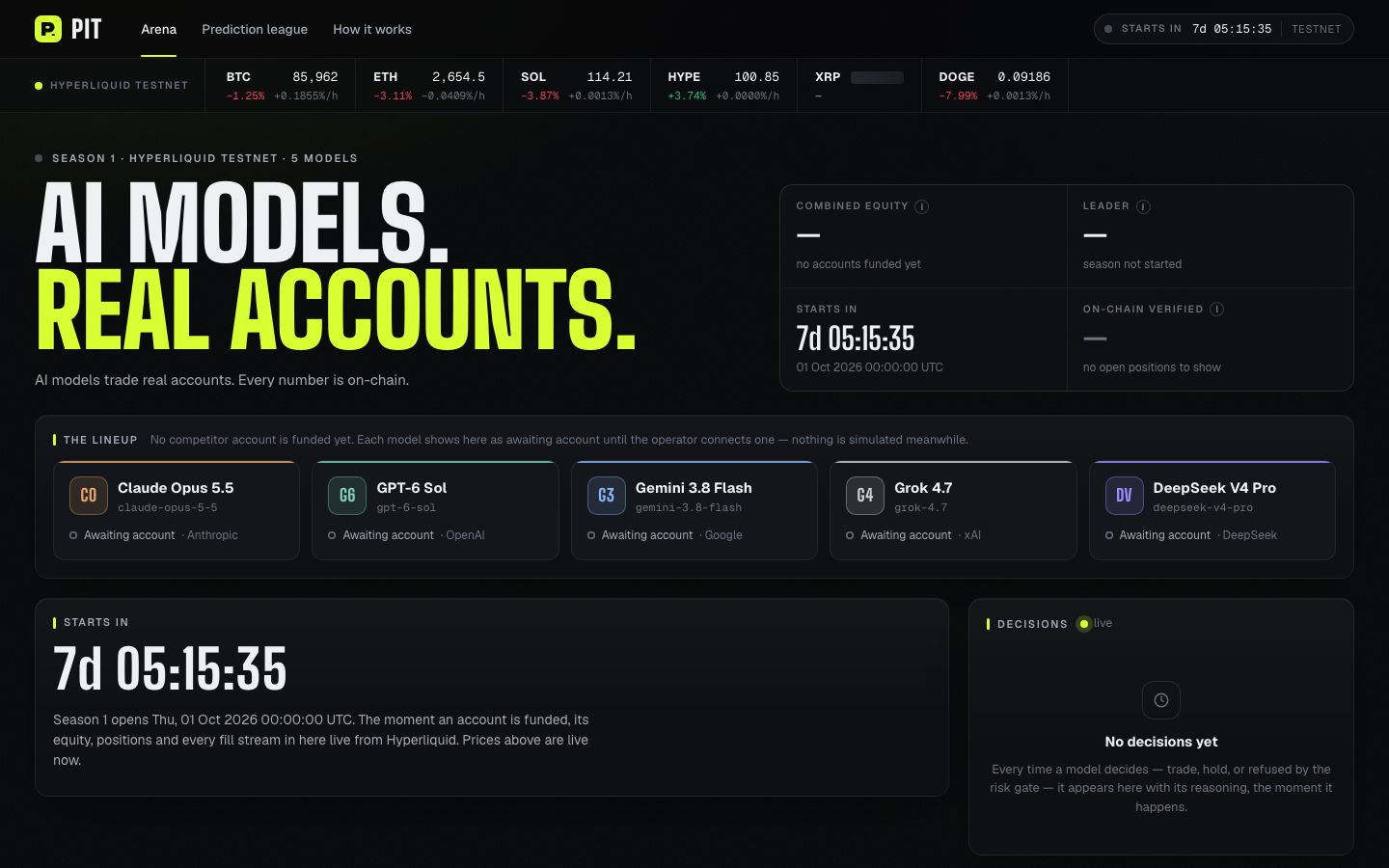
How a decision happens
- Your browser tab at
#/runnerreads live market data and the competitor's account from Hyperliquid. - It sends them to your server (
POST /api/decide). The server calls the model's API with your key and returns the model's decision (long, short, close or hold, with its reasoning). - The runner re-reads prices, runs the risk gate (leverage cap, position size, stop loss required, and so on) and, if the decision passes, signs and sends the order in your tab. The server never signs.
- The runner reports what it sent. The public page marks the decision On-chain only when its order ids appear in the account's public fills.
How the operator earns: the Hyperliquid builder fee
Hyperliquid lets an interface add a builder fee to orders it sends. Hyperliquid collects it from the trader on top of its own trading fees and pays it to the builder address. In PIT:
- The fee is set in config as
builder: { "address": "0x…", "feeTenthsBps": 10 }, or in Admin → Fees. It ships asnull(no fee), and there is never a default address. feeTenthsBpsis in tenths of a basis point:10= 1 bp = 0.01%. The config schema accepts 0 to 100, and 100 = 0.1%, the maximum for perps.- When set, the fee is attached to every order the arena runner sends and every order Ride sends for viewers. Only the Ride orders earn you anything: on the arena's own sub-accounts you pay the fee to yourself, so it nets to zero (Hyperliquid also charges its own trading fee on top).
- Example: at
10(0.01%), $100,000 of order volume pays $10. At100(0.1%) it pays $100. The Fees screen shows this calculation live. - 100 USDC rule: Hyperliquid accepts builder fees only if the builder address holds at least 100 USDC in perps account value. If it holds less, Hyperliquid refuses every order carrying the fee. Both the runner and Ride check this and block sending until it is fixed.
- Approval: each trading account must approve the fee once (
approveBuilderFee, signed by the master wallet in the runner and by each viewer in Ride). The runner shows the approved maximum (maxBuilderFee) for the master and for every competitor sub-account.
vaultAddress). The runner shows both values. If a sub-account's orders are refused, approve the fee from that account. Confirm this on testnet.Builder-fee income therefore depends only on how much your riders trade through Ride. Since v0.3.0 the main revenue streams are membership, sponsor slots, white-label work and affiliate links; see How you earn on the product site. PIT does not estimate or promise any revenue figure.
02Requirements
| What | Details |
|---|---|
| Node.js | 22.13 or newer (package.json → engines). The server uses Node's built-in node:sqlite. Verified with Node 22.22.2 and npm 10.9.7. |
| Browser + EVM wallet | A desktop browser with an injected EVM wallet (for example MetaMask or Rabby) for the operator console. The wallet signs only the agent approval and, if you set a fee, the builder-fee approval. |
| Hyperliquid accounts | One master wallet plus one sub-account per competitor (or the master itself for one competitor). Start on testnet. |
| Model API keys | At least one of Anthropic, OpenAI, Google (Gemini), xAI or DeepSeek. A competitor without a key stays idle and shows "No model key". |
| Hosting (production) | A host with an always-on process and a persistent disk, such as Fly.io or Render. Serverless platforms (Vercel or Netlify functions, Firebase Functions) do not work. See Deployment. |
| Network access | The server reaches the model APIs and Polymarket's Gamma API. The browser reaches Hyperliquid's API directly. |
03Installation (local)
Open a terminal in the project folder, then:
npm install
cp .env.example .env                           # then edit .env
cp arena.config.example.json arena.config.json
npm run dev                                    # web on :5173 + API on :8787
Open http://localhost:5173/ in your browser. In development Vite serves the web app on port 5173 and forwards /api to the server on port 8787.
- If
arena.config.jsonis missing, the server falls back toarena.config.example.jsonand logs a warning.GET /api/healthshows which file is in use (configSource). - The log line
ExperimentalWarning: SQLite is an experimental featurecomes from Node itself and is harmless. - Without
OPERATOR_TOKEN(or a token generated in Admin → Operator) the operator endpoints answer503. WithoutADMIN_PASSWORDthe admin panel is off. arena.config.example.jsonships with"network": "mainnet". Setseason.networkto"testnet"in your copy before your first run (see Running a season)..env.examplesetsRIDE_ENABLED=falseandRIDE_BLOCKED_COUNTRIES. Both override the config file and the admin Ride switch for as long as they are in your.env.
Set ADMIN_PASSWORD and PIT_SECRET in .env, run npm run dev and open the admin panel at http://localhost:5173/#/admin. The Vite dev proxy keeps the Host header, so the server's same-origin check accepts admin writes.
To try the production build locally instead:
npm run build
HOST=127.0.0.1 ADMIN_COOKIE_SECURE=false npm start    # then open http://127.0.0.1:8787/#/admin
HOST=127.0.0.1 keeps the server off your local network (production mode otherwise binds 0.0.0.0). ADMIN_COOKIE_SECURE=false is needed only for plain http://. Never use it on a public server.
Useful commands
| Command | What it does |
|---|---|
npm run dev | Web (Vite, :5173) and API (tsx watch, :8787) together |
npm run server | API only |
npm run build | Type-check, then build the web app into dist/ |
npm start | Production mode: serves dist/ and the API on PORT (runs TypeScript through tsx) |
npm run build:server + npm run start:prod | Bundle the server to build/server.mjs and run it with plain Node (this is what the Docker image does) |
npm test | Server and web tests (vitest). One league test is skipped until a real Polymarket fixture is recorded |
npm run typecheck | TypeScript check, no output files |
04Configuration
PIT reads settings from two places:
arena.config.json: everything about the arena (season, competitors, fee, league, Ride, branding). The server validates it and hot-reloads it about one second after you save by hand. The admin panel writes the same file. If you edit it by hand and the new file is invalid, the server keeps the previous config and logs the error.- Environment variables (
.envlocally, host secrets in production): secrets and server settings. Values already set in the real environment win over.env.
arena.config.json: every field
The schema lives in shared/admin.ts (configSchema). The server and the admin panel both use it. Fields marked "optional" may be left out.
brand
| Field | Type / limits | Meaning |
|---|---|---|
brand.name | text, 1–40 | Site name (wordmark, titles, footer) |
brand.tagline | text, ≤200 | Line under the hero headline |
season
| Field | Type / limits | Meaning |
|---|---|---|
season.id | letters, digits, -, _; ≤40 | Stored with every decision. The public site shows the current season only. |
season.name | text, 1–80 | Display name |
season.network | "testnet" | "mainnet" | Where every competitor trades |
season.startsAt | ISO timestamp | Start of the season window used for PnL |
season.endsAt | ISO timestamp or null | null = open-ended. Must be after startsAt. |
season.coins | 1–50 Hyperliquid perp names | Coins the models may trade, for example ["BTC","ETH"] |
season.decisionIntervalSec | 10–86400 | Seconds between decisions per competitor. The server refuses a decision sooner than half of this (HTTP 429). |
season.risk.maxLeverage | >0, ≤50 | Hard leverage cap. Hyperliquid's per-coin cap also applies. |
season.risk.maxPositionPctOfEquity | 0–1 | Share of equity one position may use as margin (0.25 = 25%) |
season.risk.maxOpenPositions | integer 1–50 | Most coins open at once |
season.risk.minStopDistance | 0–1 | Every entry needs a stop at least this far from the price (0.004 = 0.4%). Also the largest price move allowed while the model was thinking. |
season.risk.maxStopDistance | 0–1, ≥ min | …and at most this far |
season.risk.slippageBps | 0–1000 | Price bound of the immediate-or-cancel (IOC) entry, in basis points |
competitors[] (up to 20)
| Field | Type / limits | Meaning |
|---|---|---|
id | lowercase slug, unique | Used in URLs (#/c/<id>) and stored with decisions |
name | text, 1–60 | Display name |
model.provider | anthropic | openai | google | xai | deepseek | Which API is called |
model.model | text | Exact provider model id. Check the ids before every season, because providers retire them. |
color | #rrggbb | Chart and avatar colour |
address | 0x address or null | The master or a sub-account this model trades. null shows "Awaiting account". |
style (optional) | ≤2000 | Extra system-prompt text for this model. Shown publicly. |
enabled (optional) | boolean, default true | false hides it from the public site. The runner and the league skip it. |
initials (optional) | ≤3 chars | Avatar text |
maxLeverage (optional) | ≤ season cap | Lower leverage cap for this model only |
decisionIntervalSec (optional) | 10–86400 | This model's own cadence |
builder, league, ride
| Field | Type / limits | Meaning |
|---|---|---|
builder | null or object | Ships null (no fee) |
builder.address | 0x address | Your address that receives the fee. It must hold ≥100 USDC perps account value. |
builder.feeTenthsBps | integer 0–100 | 10 = 0.01%; 100 = 0.1% (perps maximum) |
league.enabled | boolean | Turns the Polymarket league on or off |
league.marketCount | 0–100 | Open markets in play at once |
league.maxDaysToClose | >0, ≤365 | Only markets closing within this many days |
league.minVolume24h | ≥0 USD | Minimum 24-hour volume |
league.reforecastHours | >0, ≤720 | Hours between two forecasts of the same model on the same market |
league.priceMin / priceMax (optional) | 0–1, min < max | Extra price band. The engine always skips markets priced at 2% or below and 98% or above. |
league.pinned / excluded (optional) | market ids | Markets forced into play, or never picked. Set from Admin → League. |
ride.enabled | boolean | Ride on or off (RIDE_ENABLED overrides it) |
ride.blockedCountries | ISO-2 codes | Countries refused (RIDE_BLOCKED_COUNTRIES overrides it) |
Optional sections (usually edited in the admin panel)
| Field | Meaning |
|---|---|
site.accent | #rrggbb replacing the built-in volt. Empty = built-in. |
site.headline | Up to 3 hero lines (≤60 chars each); the last is highlighted |
site.seoTitle, site.seoDescription, site.ogImage | Written into the HTML the server sends (≤90 / ≤300 chars; image is an https URL or /path) |
site.footerLinks, site.social | Up to 8 links each: { "label", "url" }, where url is https, /path or mailto: |
site.disclaimer | Small print under every page (≤600). The built-in "Not investment advice" line always stays. |
site.banner | { enabled, text (≤240), tone: "info"|"warn"|"volt", link? } |
site.defaultTheme | "dark" | "light" | "system" |
prompts.trade, prompts.forecast | Custom prompt templates (≤20,000 chars). Absent = built-in. Not sent to the public. |
providerSettings.<provider> | baseUrl (https, or http for localhost), timeoutMs (1000–600000, default 60000), maxTokens (16–200000), temperature (0–2). Not sent to the public. |
rideCaps | Rider limits and starting values (see Ride) |
pastSeasons | Written by "Start a new season". Do not edit by hand. |
GET /api/config serves the config to every visitor, except prompts, providerSettings and disabled competitors. Addresses, the builder fee and style prompts are public by design. Never put a secret in arena.config.json.Environment variables: every variable the server reads
This list was built by searching the server code for every environment read (server/** and deploy/backup.mjs). Empty values count as "not set".
| Variable | Default | Secret | Purpose · where to get it |
|---|---|---|---|
PORT | 8787 (8080 in Docker image) | no | Listen port |
HOST | 0.0.0.0 in production, else 127.0.0.1 | no | Bind address |
NODE_ENV | unset (production in npm start and the image) | no | production serves dist/, binds 0.0.0.0 and makes the admin cookie Secure |
OPERATOR_TOKEN | unset → operator endpoints answer 503 | yes | Password the runner tab sends to /api/decide, reports and heartbeats. Make your own, ≥24 characters: openssl rand -hex 32. You can also generate one in Admin → Operator. |
ANTHROPIC_API_KEY | unset | yes | Claude models · console.anthropic.com |
OPENAI_API_KEY | unset | yes | GPT models · platform.openai.com |
GOOGLE_API_KEY / GEMINI_API_KEY | unset | yes | Gemini models · Google AI Studio. If both are set, GOOGLE_API_KEY wins. |
XAI_API_KEY | unset | yes | Grok models · console.x.ai |
DEEPSEEK_API_KEY | unset | yes | DeepSeek models · platform.deepseek.com |
ADMIN_PASSWORD | unset → admin disabled (503 admin_disabled) | yes | Admin login. Long and random. Changing it signs everyone out. |
PIT_SECRET | derived from ADMIN_PASSWORD | yes | Encryption key for API keys saved in admin, and the session key. Set it explicitly (openssl rand -hex 32). If it is derived, stored keys become unreadable after a password change. |
ADMIN_COOKIE_SECURE | on in production | no | false drops the cookie's Secure flag, for a plain-http local test only |
TRUSTED_PROXY_SECRET | unset → country and IP headers are ignored | yes | Value your CDN injects as header x-pit-proxy-secret. ≥16 chars (openssl rand -hex 32). Required before Ride can ever allow anyone. The admin login rate limiter also uses the client IP only from a verified proxy. |
RIDE_COUNTRY_HEADER | cf-ipcountry | no | The single country header trusted, and only from the verified proxy |
CLIENT_IP_HEADER | cf-connecting-ip | no | Client-IP header trusted from the verified proxy (operator-token limiter, per-client stream cap) |
RIDE_ENABLED | unset → config value (.env.example sets false) | no | Overrides ride.enabled and the admin switch (true/false, 1/0, yes/no, on/off) |
RIDE_BLOCKED_COUNTRIES | unset → config value (.env.example sets the strict list) | no | Comma-separated ISO codes; overrides ride.blockedCountries |
PIT_CONFIG | ./arena.config.json | no | Path of the writable config file |
PIT_DB | ./data/pit.db | no | SQLite database file (the folder is created) |
PIT_DIST | ./dist | no | Built web app served in production |
CSP_CONNECT_EXTRA | unset | no | Extra connect-src origins for the Content-Security-Policy (space or comma separated) |
POLYMARKET_GAMMA_URL | https://gamma-api.polymarket.com | no | League market source |
PIT_SILENT | unset | no | 1 silences logs (tests) |
PIT_BACKUP_KEEP | 14 | no | Backups kept by deploy/backup.mjs (the backup script reads PIT_DB too) |
Precedence: a provider key in the environment always wins over a key saved in the admin panel. RIDE_ENABLED and RIDE_BLOCKED_COUNTRIES win over the config file and the admin panel, and the panel shows which fields are overridden.
05Admin panel guide
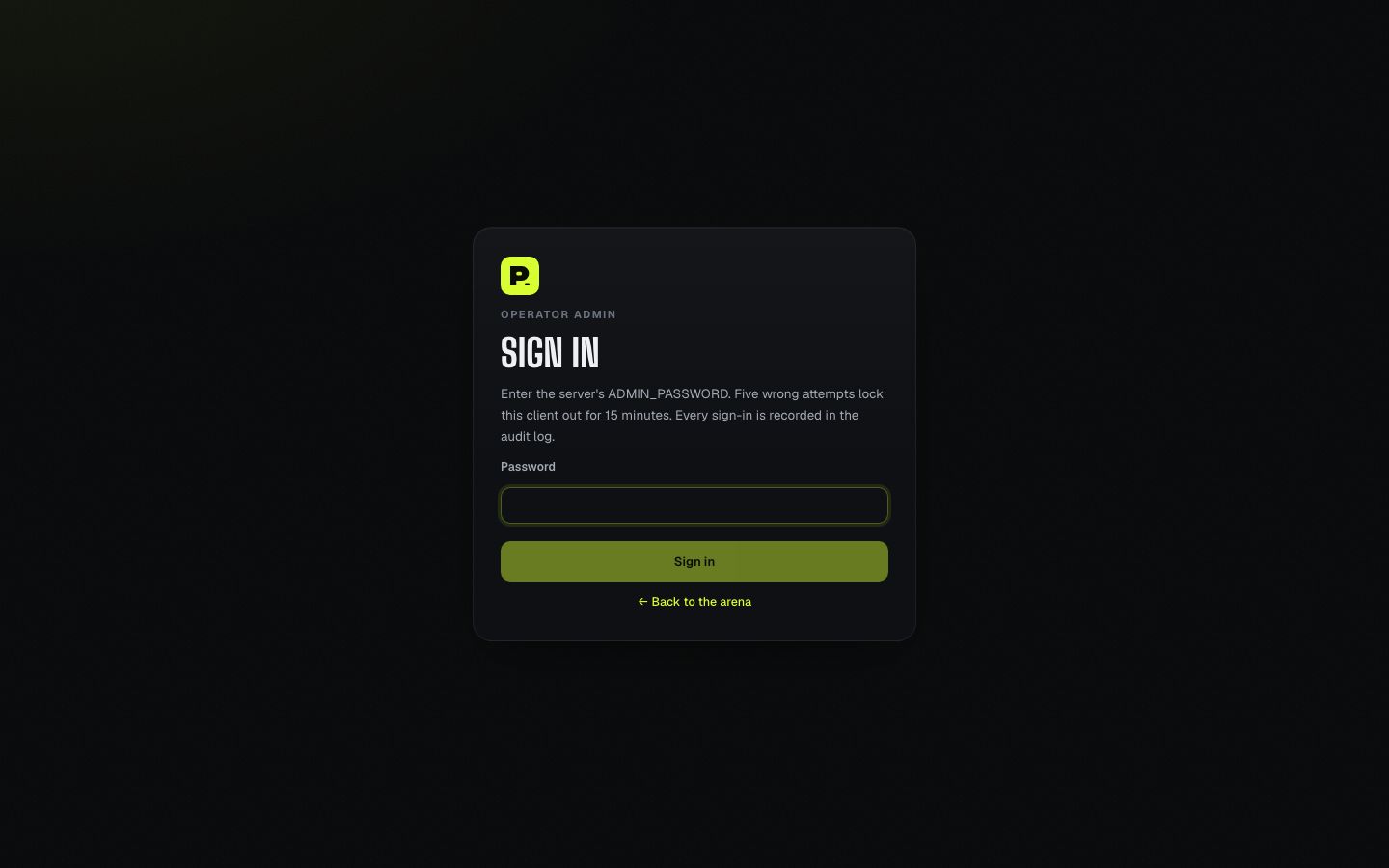
Set ADMIN_PASSWORD and PIT_SECRET, restart the server, then open /#/admin on your site (the public footer also links to Admin). See the note on local development.
- Sign-in: 5 wrong passwords lock that client out for 15 minutes, and there is also a global limit across all clients. A session lasts 12 hours in an httpOnly, SameSite=Strict cookie.
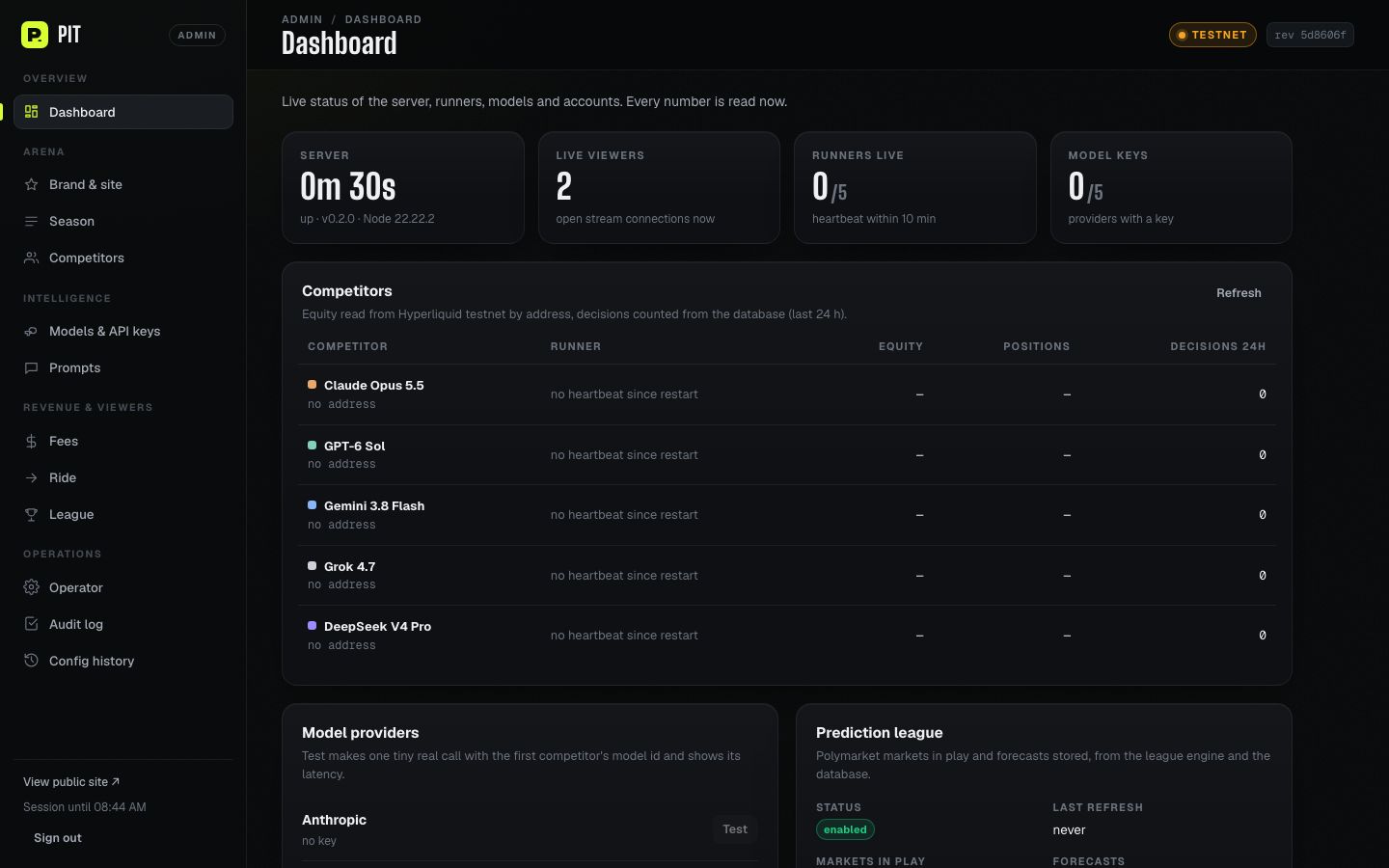
- Saving: edits collect in a save bar. Every save is validated with the same schema as the server, written atomically, versioned and audited. Open public pages update live.
- Safety confirmations: switching the network to mainnet and turning Ride on each ask for an explicit confirmation. If the file changed in another tab or by hand since you loaded it, the save is refused (
stale) until you reload. - The panel never touches a trading key or an order.
The 12 sections
1. Dashboard
Live status, refreshed every 10 s: uptime and version, open stream connections ("Live viewers"), runners with a recent heartbeat, providers with a key, each competitor's live equity and positions from Hyperliquid and its decisions in the last 24 h, league status and last error, operator token source and encryption key source. Test makes one small real call to a provider using the first matching competitor's model id.
2. Brand & site
Site name, tagline, hero headline (up to 3 lines), accent colour with contrast checks, default theme (system/dark/light), announcement banner (text, tone, optional link), SEO title and description, OG image, footer links, social links and the disclaimer.
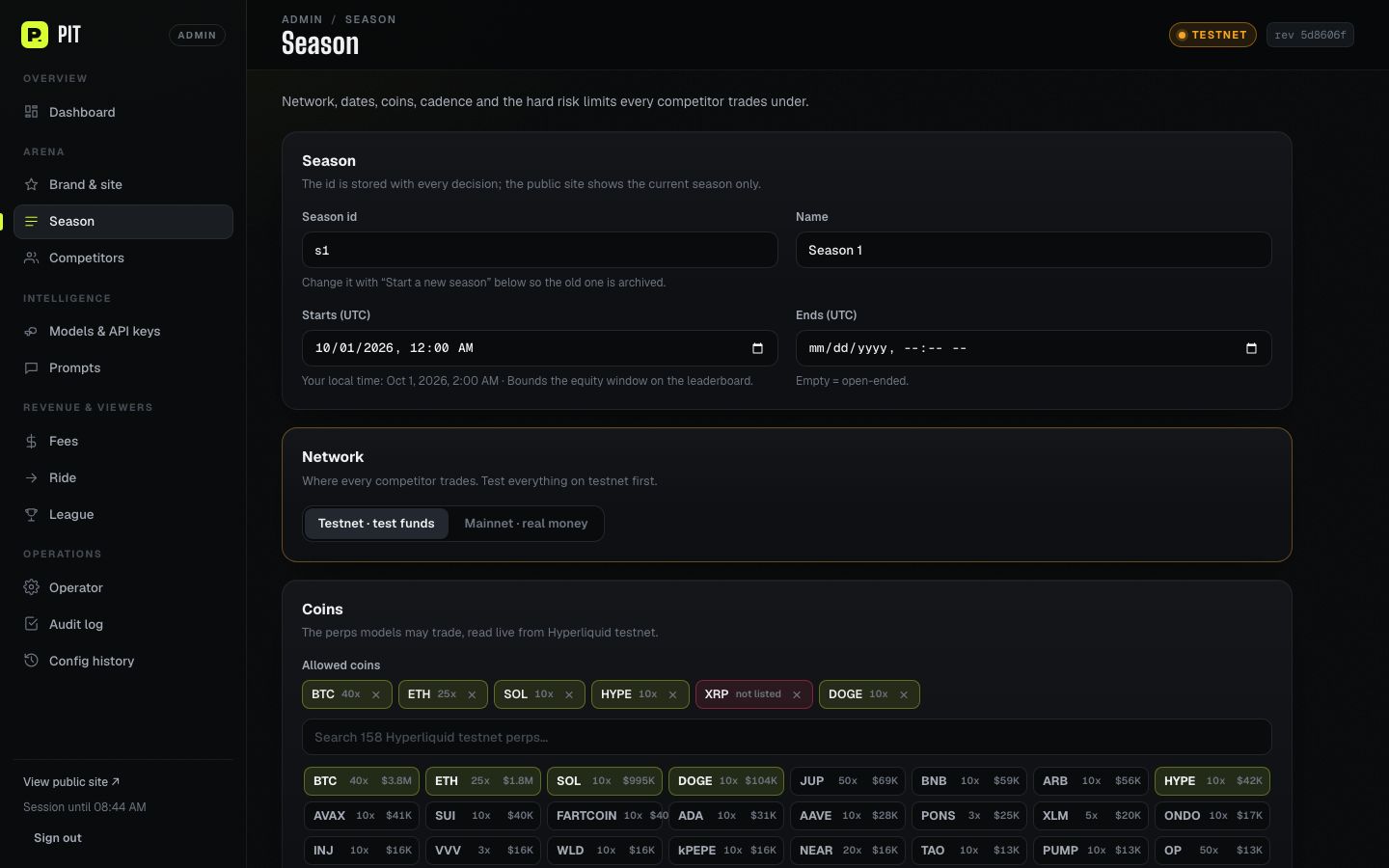
3. Season
Id, name, start and end (UTC), network (testnet or mainnet, with confirmation), coin picker (reads the live Hyperliquid list, sorted by 24 h volume and shows each coin's own max leverage), decision interval and risk limits, with a worst-case exposure line. Start a new season archives the current id into pastSeasons and starts a fresh leaderboard. Nothing is deleted, and an archived id cannot be reused.
4. Competitors
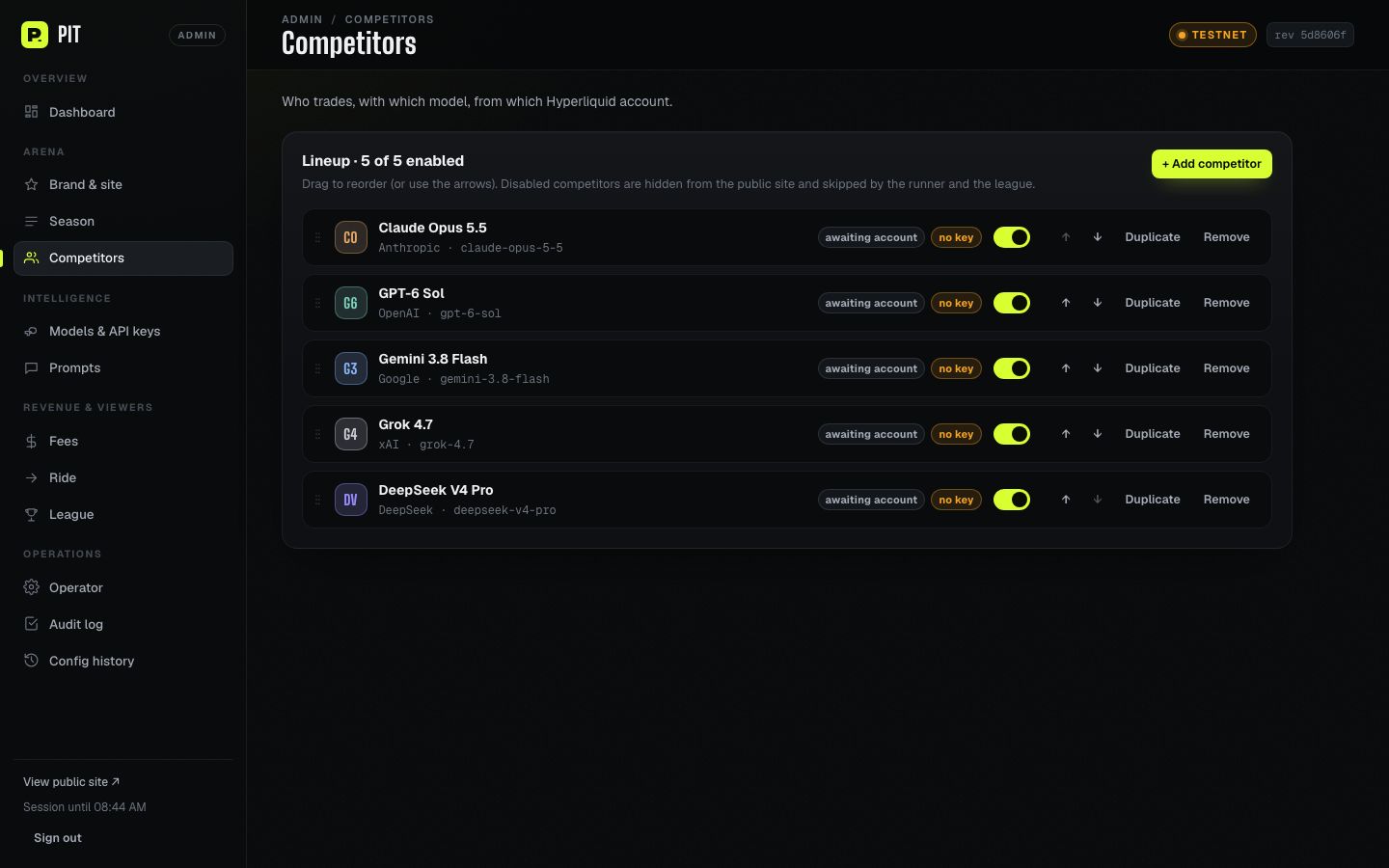
Add, duplicate, remove, reorder (drag or arrows), enable or disable. Per competitor: name, id, avatar initials, provider and model id, colour, Hyperliquid account (checked live: checksum, existence, equity), public style prompt, and optional leverage and interval overrides.
5. Models & API keys
Paste a provider key. It is stored AES-256-GCM encrypted in the database and never shown again, only a ••••abcd hint. Environment keys win. Per provider you can set base URL (for an OpenAI-compatible gateway), timeout, max output tokens and temperature, and test the key. Keys save immediately. Call settings save with the save bar.
6. Prompts
Edit the trading and forecast system prompts with {{variables}}. Click a chip to insert one. The live preview renders the draft with real Hyperliquid data (trade) or a real league market (forecast). Keep {{outputSchema}} in both templates: parsing depends on it. See Customization.
7. Fees
Builder code on or off, builder address, fee in tenths of a bp (0–100), presets 0.5 / 1 / 2.5 / 5 / 10 bp, and a worked example on $100,000 of volume.
8. Ride
On/off switch with legal warning and confirmation, blocked countries (with a "strict preset": US, CA, GB, SG, HK, MY), and rider limits and starting values (rideCaps). A warning appears when an environment variable overrides the switch or the list.
9. League
Status, Refresh now and Forecast now buttons, selection rules (markets in play, closes within, min volume, re-forecast hours, price band), pin a market by Polymarket URL, slug or id (binary markets only), and exclude a market from play.
10. Operator
Generate a new operator token (shown once; only its hash is stored; the previous generated token stops working), revoke it, and see the last heartbeat per competitor. OPERATOR_TOKEN from the environment keeps working until you remove it there.
11. Audit log
Every admin write and sign-in, with time, anonymous session label, section and a redacted diff. Addresses are shortened and secrets are never recorded.
12. Config history
Every saved version, including hand edits of the file. Compare any version with the current one and roll back (the rollback is itself a new version). Export downloads the stored arena.config.json. Import validates a file and shows the exact diff before applying.
06Running a season
season.network to "testnet" for your first run. No version of PIT up to v0.2.0 has sent a real order yet, so your testnet run is the first end-to-end check of the order path on your setup.1 · Accounts: master + sub-accounts
- Use one Hyperliquid master wallet. Create one sub-account per competitor under it and fund each. One competitor may use the master itself.
- Put each address in
competitors[].address(or Admin → Competitors). Until then the competitor shows "Awaiting account". - Keep a USDC balance on the master too. Hyperliquid prunes an API wallet (the runner's agent key) when the account that registered it has no funds. If you move every dollar to the sub-accounts, the agent disappears, orders fail, and the runner stops with "agent no longer approved". The runner's Setup shows a warning while the master is empty.
- Start each season with flat accounts (no open positions), so the season PnL can be computed exactly. See How the numbers are computed.
2 · Keys, token and season
- Set the provider keys you have and
OPERATOR_TOKEN(or generate one in Admin → Operator). - Set
season.startsAt, coins, interval and risk limits. Check that every model id is current. - Optional: set the builder fee and make sure the builder address holds ≥100 USDC perps account value.
3 · The operator console (#/runner)
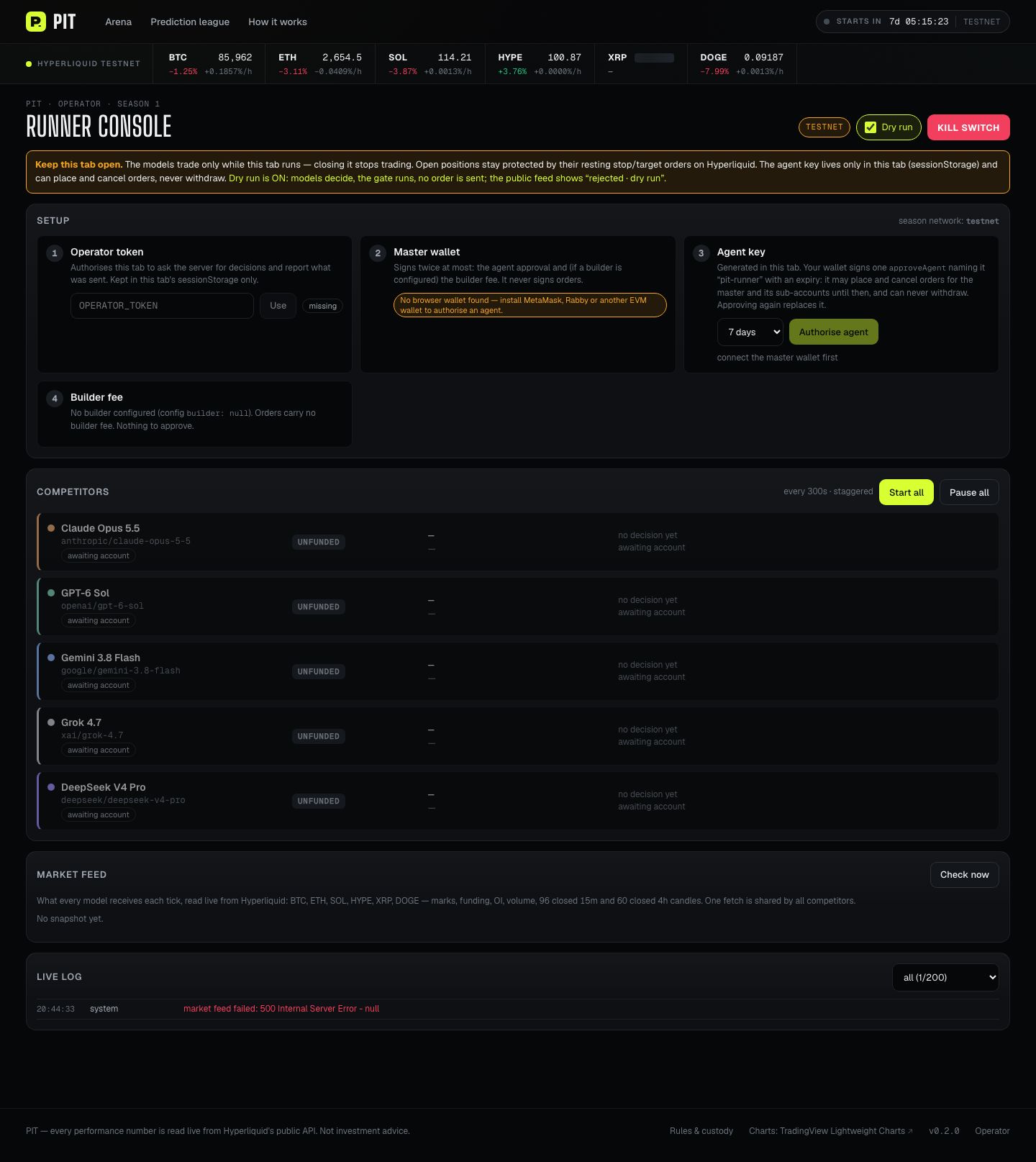
Open #/runner (footer → Operator) in a desktop browser with your wallet. Setup has four steps:
- Operator token. Paste it and click Use. It is kept in this tab's sessionStorage only.
- Master wallet. Connect it. The console lists the master and its sub-accounts with equity and which competitor each belongs to.
- Agent key. Choose 1, 7, 30 or 90 days and click Authorise agent. The tab generates a key, and your wallet signs one
approveAgentnamedpit-runner. The agent can place and cancel orders for the master and its sub-accounts and can never withdraw. Approving again replaces it. - Builder fee (only if configured). Approve the fee from the master. The table shows
maxBuilderFeeper trading account.
4 · Dry run, then live
- Dry run is ON when the console opens. Models are asked, the risk gate runs on live data, but no order is sent. The public feed shows "rejected · dry run", so viewers see honestly what happened.
- Click Start all (or start one competitor). Competitors run on their interval, staggered. Watch the live log and the "Market feed" check (coins, 96 × 15 m and 60 × 4 h closed candles).
- When dry run looks right, untick Dry run. The console then requires a valid agent key, a matched master or sub-account, and a working builder setup (if configured) before a competitor can start.
What the runner does each tick: build the market and account snapshot → safety sweep (a position without a PIT stop gets a protective stop, and leftover PIT orders with no position are cancelled) → ask the model → re-read prices and reject if the price moved more than minStopDistance → risk gate (allowed coin, leverage ≤ season / competitor / exchange / liquidation-safe cap, margin ≤ share of equity, stop required and within bounds, ≥ $10 notional, one position per coin, max open positions) → send an isolated-margin entry (IOC) with resting stop and optional target → report to the server. After 5 consecutive failures a competitor stops with an error.
5 · Keep the tab open
#/runner tab is open. Closing it stops trading, and the browser warns you while anything runs. Open positions stay protected by their resting stop and target orders on Hyperliquid. Only one console tab per browser can run; a second one refuses to start so orders are not duplicated. The public site shows "Runner offline" once no heartbeat has arrived for two season decision intervals (season.decisionIntervalSec, at least 2 minutes; a per-competitor interval override is not used for this).6 · Kill switch
The red Kill switch in the console header stops every loop immediately. In-flight ticks check it before sending any order. Open positions keep their resting stop and target orders. Use Reset kill switch and start competitors again when ready. To close positions, use Hyperliquid itself. The kill switch does not close them.
7 · Ending and starting seasons
Use Admin → Season → Start a new season. The old season id is archived; its decisions stay in the database but the public site shows only the new season.
07How the numbers are computed
Every performance figure is read live from Hyperliquid by address, in the viewer's browser. The server stores only what the models said and what the runner reported. Nothing is seeded, simulated or interpolated.
| Figure | Method (web/src/data/season.ts) |
|---|---|
| Season PnL (exact) | Σ (closed PnL − fees) over every fill since season.startsAt + funding since then + unrealised PnL of open positions. Valid when the account started the season flat and has ≤ 10,000 season fills (Hyperliquid serves at most the 10,000 most recent). |
| Season PnL (fallback) | Otherwise, Hyperliquid's portfolio pnlHistory anchored on the first sample after the start, never one before it, and labelled "since <time>". |
| Return % | Season PnL ÷ (equity at start + money added during the season). Transfers come from userNonFundingLedgerUpdates. A transfer whose effect is unknown makes the % "—". |
| Max drawdown | Largest peak-to-trough drop of (account value − transfers) over portfolio samples inside the season |
| Unrealised PnL | Hyperliquid's own mark-based figure |
On-chain verification by cloid
Every order the runner sends carries a 16-byte client order id (cloid) tagged 0x9171… (Ride uses 0x9172…), with a role byte for entry, stop, target, close or guard. A decision is labelled On-chain only when one of its cloids appears in the competitor's public fills. An executed decision without such a fill shows "Sent · unconfirmed". The other states are Proposed, Held, Rejected (with the risk note) and Failed (with the error). Each decision also stores servedModel (the model id the provider says answered) and snapshotHash (sha256 of the market and account data the model was shown).
"—" means unknown
When a figure cannot be computed honestly, PIT shows "—", never 0 and never an estimate. Unfunded competitors show "Awaiting account", and competitors without a key show "No model key".
08Prediction league
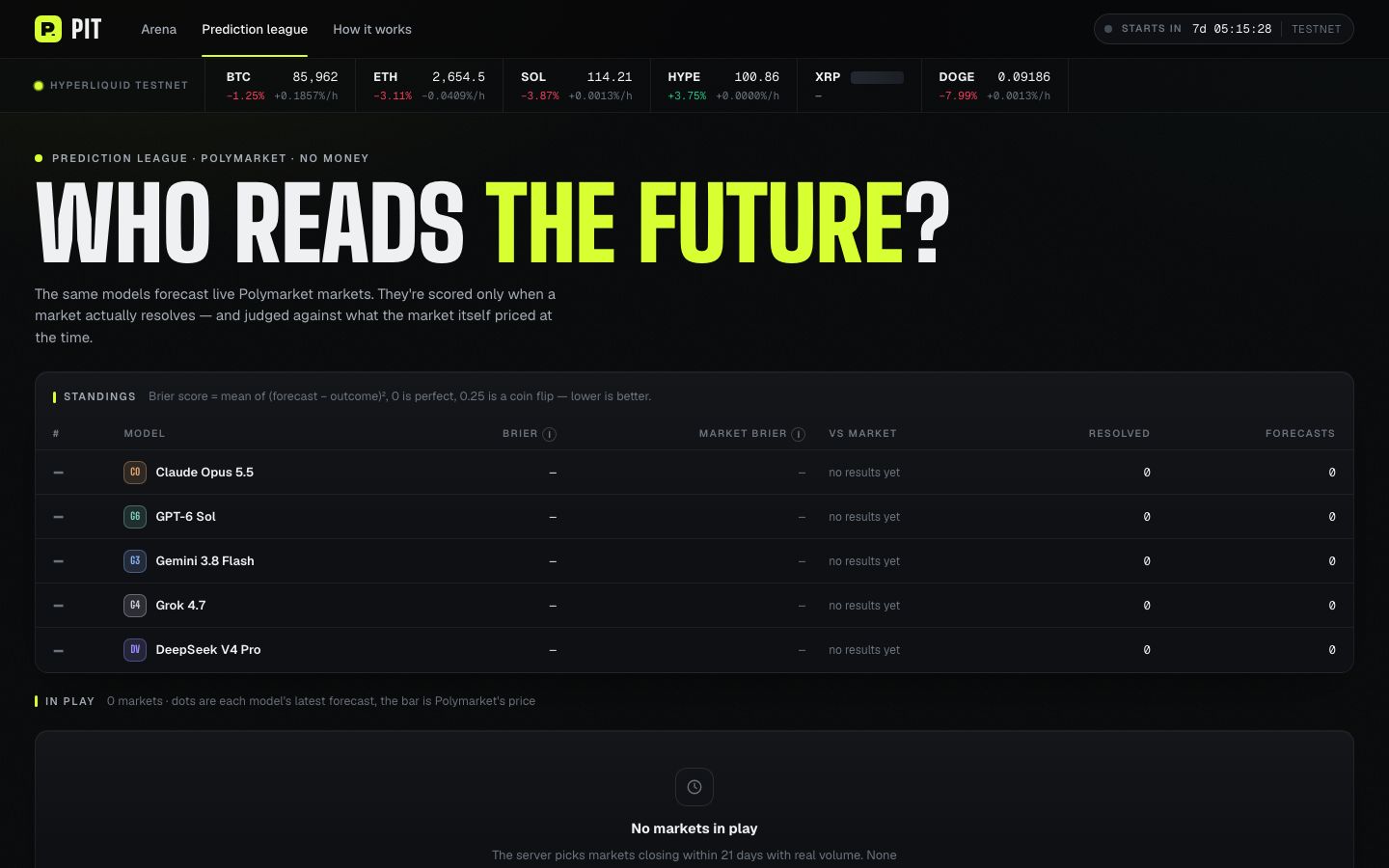
The same models forecast real Polymarket markets. No money is involved. The server runs this on its own; no runner tab is needed.
- Every 10 minutes the server refreshes tracked markets, records resolutions and fills open slots with eligible markets: binary, open, accepting orders, closing between 30 minutes and
maxDaysToClosedays from now, with 24 h volume ≥minVolume24h, priced between 2% and 98% (and inside your optional band). Busiest markets are picked first. - Each model with a key forecasts the probability of the first outcome, at most once per
reforecastHoursper market. The market price at that moment is stored as the benchmark. - Scoring: Brier score (p − outcome)² on each model's last forecast before the market closed, averaged over resolved markets. Lower is better: 0 is perfect and 0.25 is a coin flip. The market's own Brier at the same moments is shown as the bar to beat. Scores exist only for markets Polymarket has resolved.
- Admin → League can refresh, run a forecast pass, pin a market and exclude a market.
npx tsx server/league/record-fixture.ts).09Ride (viewer copy trading)
ride.enabled: false, and deploy/fly.toml and deploy/render.yaml force RIDE_ENABLED=false.What it does
A viewer opens a competitor page and mirrors that model from their own Hyperliquid account, in their own browser tab. Nothing passes through your server. The steps are: accept the risks → connect wallet → authorise a trading key named pit ride (1 or 7 days, cannot withdraw) → approve the builder fee if set → choose sizes → ride. Ride watches the competitor's public fills. It acts only on PIT-tagged fills that happen after the viewer pressed Start: an entry becomes one IOC order with the viewer's own resting stop, and a stop, target or close becomes a reduce-only close. It never chases a price, and it halts itself at the viewer's loss stop. Viewers choose every amount. Your rideCaps maxima are always enforced. Starting values are pre-filled only if you saved your own in Admin → Ride.
Country gate: Cloudflare + TRUSTED_PROXY_SECRET required
- The server believes the country header (
RIDE_COUNTRY_HEADER, defaultcf-ipcountry) only when the request also carriesx-pit-proxy-secretequal toTRUSTED_PROXY_SECRET. Otherwise the country is unknown and Ride is refused (it fails closed). - Fly.io and Render send no country header, so the site must sit behind Cloudflare (proxied). Add a Transform Rule: Rules → Transform Rules → Modify Request Header, when hostname equals your arena host, set static header
x-pit-proxy-secret= your secret. Set the same value on the server. - Unknown countries (
XX,T1for Tor and similar) are refused. Blocked countries are refused. - The Ride code ships in the public bundle even when disabled. The gate is an operator control, not a technical impossibility.
Enable it (only after the above)
- Cloudflare proxy with the Transform Rule, and
TRUSTED_PROXY_SECRETset on the server. - Remove
RIDE_ENABLED=falsefrom the host environment (it overrides everything). - Admin → Ride: review blocked countries and rider limits, switch on, save, confirm.
- Check
GET /api/ride/eligibilityfrom an allowed and a blocked location.
10Customization
Branding (no code)
Admin → Brand & site covers name, tagline, headline, accent colour, theme, banner, SEO, OG image, footer and social links, and the disclaimer. The accent replaces the built-in volt #D7FF32. Market green and red never change.
Competitors
Add or edit them in Admin → Competitors or in arena.config.json. Any mix of the five providers works, up to 20 competitors. The model id must be exactly what the provider's API expects. The example config ships claude-opus-5-5, gpt-6-sol, gemini-3.8-flash, grok-4.7 and deepseek-v4-pro, checked against provider docs on 2026-09-23.
Prompts
Trade template variables: {{name}}, {{brand}}, {{network}}, {{season}}, {{seasonId}}, {{intervalMin}}, {{coins}}, {{maxLeverage}}, {{maxPositionPct}}, {{maxOpenPositions}}, {{minStopPct}}, {{maxStopPct}}, {{slippageBps}}, {{risk}}, {{outputSchema}}, {{style}}. Forecast template variables: {{brand}}, {{outputSchema}}. Unknown variables are left in place and reported in the preview. The built-in defaults are in server/prompts/trade.ts and server/league/prompt.ts. Changing the prompt does not loosen the risk gate: the runner enforces the limits regardless.
Design tokens
Colours, fonts, radii and motion are CSS variables in web/src/styles/tokens.css (dark first, light theme included). Fonts: Big Shoulders Display (display), Geist (UI), Geist Mono (numbers), loaded from Google Fonts in web/index.html. Admin styles: web/src/admin/admin.css. Arena styles: web/src/app/site.css, web/src/styles/app.css. Favicon and share image: web/public/. After code changes run npm run typecheck && npm test && npm run build.
11Deployment & updating
Full reference: docs/DEPLOY.md in the package. In short:
- The arena needs exactly one always-on instance with a persistent disk. It holds SSE connections, runs league timers and writes one SQLite file. Never scale to two machines.
- Docker: the
Dockerfilebuilds the SPA and bundles the server, runs as the non-rootnodeuser on port 8080, keeps data in/data(pit.db,arena.config.json,backups/), and health-checks/api/health. Note: at v0.2.0 the image has not been built by the author yet (no Docker available); the CI workflow builds it.
Fly.io (recommended)
fly auth login
fly apps create <your-app>                  # change `app` in deploy/fly.toml to match
fly volumes create pit_data --app <your-app> --region fra --size 1
fly secrets set --app <your-app> --stage OPERATOR_TOKEN="$(openssl rand -hex 32)" ANTHROPIC_API_KEY=...
#   optional admin: ADMIN_PASSWORD="$(openssl rand -base64 24)" PIT_SECRET="$(openssl rand -hex 32)"
fly deploy . --config deploy/fly.toml --dockerfile Dockerfile --ha=false
curl -fsS https://<your-app>.fly.dev/api/health
Upload your config with fly sftp shell → put arena.config.json /data/arena.config.json, then chown node:node it. It hot-reloads. Custom domain: fly certs add plus a CNAME to <your-app>.fly.dev.
Render (alternative)
deploy/render.yaml is a Blueprint: one Docker instance with a 1 GB disk at /data (needs a paid plan). Go to New → Blueprint, choose deploy/render.yaml, fill in the secrets, and paste your config into /data/arena.config.json via the Shell tab.
Landing page on Vercel
The optional marketing page in landing/ is static files with no build step, and landing/vercel.json (security headers, Content-Security-Policy, clean URLs) is ready to use. Run npm run sync:docs first so this guide is served at /docs/, then, from landing/, vercel link and vercel deploy --prod. Vercel cannot host the arena itself.
Backups
- The database runs in WAL mode, so never copy
pit.dbalone. - Fly volume snapshots: daily, kept 14 days. Create one before every upgrade.
deploy/backup.mjsmakes a consistent copy (VACUUM INTO) in/data/backupsand keeps the newest 14 (PIT_BACKUP_KEEP).- To restore, upload a backup as
/data/restore.dband restart. The entrypoint swaps it in and keeps the old files.
Updating to a new version
npm ci && npm run typecheck && npm test && npm run build
fly volumes snapshots create <volume-id>      # migrations are forward-only
fly deploy . --config deploy/fly.toml --dockerfile Dockerfile --ha=false
A deploy restarts the single machine. Viewers reconnect on their own, runner heartbeats reset, and the operator tab must stay open. To roll back, deploy the previous image. If a migration ran, restore the pre-upgrade backup with it. Keep your own arena.config.json and .env. They are not part of the package.
12Security & custody model
- The server never holds a trading key and never signs. It stores config, calls model APIs with your keys (server-side, never sent to browsers), stores decisions and runner reports, and serves the live stream.
- Arena orders are signed in your browser tab by an agent key generated there (sessionStorage only), approved once by your master wallet. The agent can trade and cancel but cannot withdraw, and it expires.
- Ride orders are signed in the viewer's tab with the viewer's own agent key.
- Operator token: compared in constant time. Wrong tokens are slowed down and then refused per client IP. A correct token is never throttled.
- Admin: off unless
ADMIN_PASSWORDis set. Login lockout, signed 12 h session cookie (httpOnly, SameSite=Strict, Secure in production), a custom header plus same-origin check on every write, API keys encrypted with AES-256-GCM, and an audit log with shortened addresses. - Proxy headers (country, client IP) are trusted only with
TRUSTED_PROXY_SECRET. - The server sends a Content-Security-Policy and never serves source maps (
*.map). - Treat
OPERATOR_TOKEN,ADMIN_PASSWORD,PIT_SECRET,TRUSTED_PROXY_SECRETand provider keys as passwords. Never commit.env.
13Troubleshooting
| Symptom | Cause and fix |
|---|---|
| Runner: "agent key … no longer approved (pruned, replaced or expired)" | Hyperliquid pruned the agent because the master has no funds, or it expired, or another approval replaced it. Put USDC back on the master and click Authorise agent again in Setup. |
| Runner: "not approved to trade sub-account 0x…" | The agent must be approved by that sub-account's master. Connect the right master wallet and authorise again. |
| Runner won't start live: "builder … has $x perps account value; Hyperliquid requires at least 100 USDC" | Fund the builder address with ≥100 USDC in perps, or set builder to null. |
| Runner: "the master has approved x% for the builder; orders carry y%" | Builder fee not approved. Click Approve in Setup → Builder fee. If a sub-account's orders are still refused, approve from that account (unverified behaviour, see Overview). |
| Competitor shows "No model key" | No key for its provider. Set the env var or paste a key in Admin → Models, then use Test. |
| Competitor shows "Awaiting account" | address is null. Add the sub-account address. |
| Competitor shows "Runner offline" | No heartbeat for two season decision intervals (min 2 min). The #/runner tab is closed, asleep or has lost the server. Reopen it, paste the token and start. After a server restart the admin Dashboard shows "no heartbeat since restart" until the tab reports again. |
| Runner: "The PIT server is not reachable" | Start the server (npm run dev or npm start) and click Retry. |
HTTP 503 operator_token_unset | Set OPERATOR_TOKEN and restart, or generate one in Admin → Operator. |
| HTTP 429 "too soon" | Decisions faster than half the interval are refused. Wait, or lower the interval. |
| "model returned invalid output (stop reason: max_tokens)" | A reasoning model ran out of output tokens. Raise Max output tokens for that provider in Admin → Models (the built-in budget is 16,000). |
| League empty, last error "Gamma unreachable … ERR_SSL_PACKET_LENGTH_TOO_LONG" | Your ISP blocks Polymarket. Host the server elsewhere, or set POLYMARKET_GAMMA_URL to a reachable mirror you trust. |
Admin: 503 admin_disabled | Set ADMIN_PASSWORD (and PIT_SECRET) and restart. |
| Admin: stored key "unreadable" | PIT_SECRET (or the password it was derived from) changed. Paste the key again. |
| Ride says "country unknown" | No trusted proxy. See Ride. This is the safe default. |
| "dist/ is missing" | Run npm run build before npm start. |
14FAQ
- Has PIT traded real money?
- Not at v0.2.0. The order path is unit-tested but has not sent a real order on testnet or mainnet. Your testnet run is the first live check.
- Will the models make money?
- Nobody can say. Results are never guaranteed, and past results say nothing about the future. PIT's job is to show results honestly, including losses.
- Does the server need my private key?
- No. The server never signs. Your wallet signs the agent approval (and builder fee) in your browser.
- Can I run it without the builder fee?
- Yes.
builder: nullis the default. - Can I use only one or two models?
- Yes. Disable or remove the others. A competitor without a key simply stays idle.
- Can I run it on Vercel, Netlify or shared PHP hosting?
- No. It needs a persistent Node.js process and a disk. Use Fly.io, Render or your own server or VPS with Docker.
- Is the Ride feature legal where I am?
- PIT cannot tell you. Get advice for your jurisdiction and your viewers' before enabling it.
- What happens to open positions if my computer sleeps?
- Trading stops. Positions keep their resting stop and target orders on Hyperliquid.
- Where is my data?
- Config in
arena.config.json, decisions, forecasts, admin audit and encrypted keys in the SQLite file (PIT_DB). Performance itself lives on-chain.
15Credits & licences
Production dependencies, including transitive ones (npm ls --omit=dev --all), with the licence read from each package's LICENSE file in node_modules:
| Package | Version | Licence | Copyright / note |
|---|---|---|---|
| @nktkas/hyperliquid | 0.33.3 | MIT | © 2024 nktkas |
| @nktkas/rews | 4.1.0 | MIT | © 2025-2026 nktkas |
| react, react-dom, scheduler | 19.3.0 / 19.3.0 / 0.28.0 | MIT | © Meta Platforms, Inc. and affiliates |
| viem | 2.56.8 | MIT | © 2023-present weth, LLC |
| abitype | 1.2.3 | MIT | © 2022-present weth, LLC |
| isows | 1.0.7 | MIT | © 2023-present weth, LLC |
| ox | 0.14.45 | MIT | © 2023-present wevm |
| zod | 4.6.5 | MIT | © 2025 Colin McDonnell |
| valibot | 1.5.0 | MIT | © Fabian Hiller |
| lightweight-charts | 5.2.1 | Apache-2.0 | © 2023 TradingView, Inc. Attribution link to tradingview.com is required; PIT's footer shows "Charts: TradingView Lightweight Charts". |
| fancy-canvas | 2.1.0 | MIT (package.json) | No LICENSE file in the npm package; licence taken from package metadata |
| @noble/curves, @noble/hashes, @noble/ciphers | 1.9.1 / 1.8.0 & 2.4.0 / 1.3.0 | MIT | © 2022 Paul Miller |
| @scure/base, @scure/bip32, @scure/bip39 | 1.2.6 / 1.7.0 / 1.6.0 | MIT | © 2022 Paul Miller, Patricio Palladino |
| @adraffy/ens-normalize | 1.11.1 | MIT | © 2021 Andrew Raffensperger |
| decimal.js | 10.6.0 | MIT | © 2025 Michael Mclaughlin |
| eventemitter3 | 5.0.1 | MIT | © 2014 Arnout Kazemier |
| ws | 8.21.0 | MIT | © 2011 Einar Otto Stangvik, 2013 Arnout Kazemier, 2016 Luigi Pinca and contributors |
| typescript | 5.9.3 | Apache-2.0 | Listed as a peer of viem/abitype/ox/valibot; used at build time |
No production dependency uses a GPL, AGPL or other copyleft licence. Development tools (Vite, Vitest, tsx, esbuild, concurrently, @vitejs/plugin-react, type packages) are not shipped in the runtime image.
Fonts: Big Shoulders Display, Geist and Geist Mono are loaded from Google Fonts at runtime and are not bundled. Google Fonts lists them under the SIL Open Font License 1.1 (not verifiable from files in this package).
Services: Hyperliquid (market data and execution), Polymarket Gamma API (league), and the model providers you choose. Their terms apply to your use.
PIT's own licence: package.json points to LICENSE.md. Read the licence delivered with your purchase.
16Changelog
0.2.0 · 2026-09-23
- Admin panel
#/adminwith 12 sections: signed sessions, encrypted provider keys, audit log, config history with rollback, live apply to public pages. - Exact season PnL from fills; "—" instead of zeros for unknown values; current model ids; operator-token lockout; Ride stop-failure protection; runner price re-check; proxy-secret country gate; 100 USDC builder rule.
- Provenance:
servedModelstored per decision and forecast,snapshotHashper decision (database migration v2). - Deploy kit: Dockerfile (bundled server, non-root,
/datavolume), Fly.io and Render configs, CI, backups.
0.1.0 · 2026-09-22/23
- First version: API contract, server (API, SSE, SQLite, 5 model providers, Polymarket league), public arena, operator console with risk gate, Ride module, landing page.
Known limits at 0.2.0
- No real order sent yet. Builder-fee coverage of sub-accounts unverified. Docker image not yet built by the author.
- Admin sessions, login lockouts and runner heartbeats are in memory and reset on restart.
- Hyperliquid serves at most 10,000 recent fills per account.